Graphic Design and Illustration.

A Designer’s Guide to Flexo Printing – Part I

Halftones


Introduction.

I’ve decided to write a multi-part piece on Flexographic printing as it relates to Graphic Designers. Flexo printing is quite a unique beast, and it has been my experience that most designers out there are not too familiar with flexo printing. For more than half of my 18 year career I have either been designing for flexo or dealing with production issues related to generating films and plates for flexo printing. I’ve decided to pass on a few things to the general design community.

So Just What is Flexo Printing Anyway?
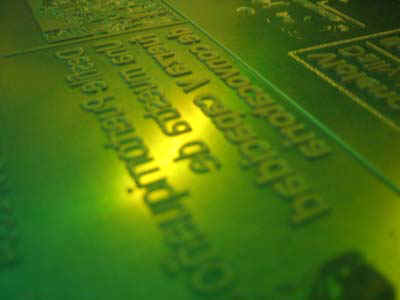
Image courtesy of Wikipedia.

Image courtesy of Wikipedia.

Flexo printing is a very different beast from offset printing. It is similar in nature to screen printing, but with a lot more issues. The printing plates are made from a very flexible plastic material, usually pink in colour. Somewhat translucent. The images and halftone dots on these printing plates are often very raised and quite noticeable. Wikipedia has a lot more to say about the process.

It is very flexible (really bad pun there) when it comes to the many substrates you can print on. Everything from plastics, metals and corrugated cardboard can be printed flexographically. You will see flexo printing used a lot in packaging. Walking down the aisles in your local grocery store, just about everything in soft drinks, cheeses, prepackaged sandwich meats, tetrapack juice boxes and potato chip bags will be printed this way. And probably quite a bit more.

It’s a wonder with all the packaging being created these days, that more effort isn’t being made to prepare designers for this print medium.

A Brief Couple of Notes First.

While the topics I will cover are of a technical nature, I will try no to get too involved in technical details. That will only confuse the issue and will make for really long posts. I just want to cover basic design problems when dealing with flexo.

I am also writing this with the assumption that people will have a basic understand of printing terminology. I am not going to be spending a lot of time discussing terms like dot gain, or ink trapping.

Lastly, this is mainly a nuts and bolts technical discussion about design. I will not be getting into design or marketing theories regarding packaging and retail. Or the psychology of colour. Or current trends in graphic design. This will be a practical discussion only. You will find though, that many of the things I go over, may fly in the face of current design trends. Flexo has a way of doing that. You get too focused on the technical side of things and the artistic or marketing aspects of design sometimes get left behind. And technicians shouldn’t be the final say in what good design should be. Hopefully, you will be able to find a good middle ground where the printers are reasonably satisfied, and the integrity of the design is maintained. Though, it may require the designer to have to occasionally stand up for themselves 🙂  Hopefully these blog posts will reduce the amount of bloodshed.

After my final post, I will provide some links to the admittedly few online resources I can find on designing for flexo printing. They will go into more detail on flexo printing specs than I will get into.

My First (And Best) Piece of Advice.

The range of print quality in flexo is quite vast. You will have printers who cannot print much more than basic line art with maybe a few simple gradients. And others who come awfully close to matching the quality of offset printing. In my experience, most flexo printers float somewhere in between those two extremes. They can do much more than basic line art, but there may be many restrictions about just what they can do. Getting a hold of the printer and finding out what they are capable of will go a long way to getting a design that will reproduce properly and without any headaches. It will also reduce disappointment you and your clients may have if the final printed piece does not meet your expectations, or if the printer makes any drastic changes to your work.

And to make things worse, you will discover over the course of these blog posts that many of the things you take for granted as a designer either cannot be done easily, or at all, flexographically.

Lastly, because of the great variety in press qualities out there, a lot of the advice I’ll be giving may not always work for your printer. I am going to try and keep things as universal as I can, but there will always be exceptions. Just one more reason to have a good working relationship with your printer.

Quick Little Update

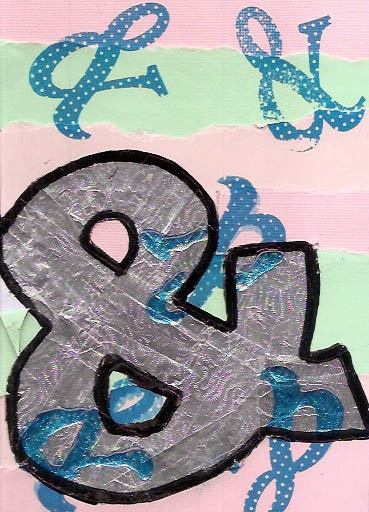
I’ve blogged quite a bit regarding the Ampersand Project, a little side project of the Sketchbook Project. So here is a quick little update of how things went.

The Ampersand Project is now closed, with all results digitized. There is a Flickr stream of the images available. Mine can be found by clicking here. We have also received our painting swap. From someone named Lesley Wilmoth. Too bad that is all the info I have. It is a nice mixed media panting with lots of interesting textures. The colour scheme will fit quite nicely with the decor of my co-artisit’s room and will be hung with pride once I can track down a suitable frame. You can see the image here:

Lesley Wilmoth Ampersand

Image of the Month – March 2014

March_2014


Just in time for the end of the month! It has been quite a hectic month for me, both professionally and personally. Luckily, I had this up my sleeve.

It’s a drawing of my son, Aiden, who turned 1 this month. I drew this out in a Adobe Ideas on my iPhone with just a few finishing touches on my desktop using Adobe Illustrator. I feel this is my best drawing yet using Adobe Ideas. It’s quite a different experience drawing on such a small device. Maybe one day I will be able to justify a tablet and see how much different/better the experience is.

Enjoy.


Wallpapers, Part Four

As I have been doing this past month, here is another wallpaper made with the program Frax. I’ve reviewed it before. You can read about it by clicking here. Each wallpaper will come in a variety of sizes. Hopefully you will find a size close to your monitor settings. At the end of the month, I’ll be putting the whole thing up as a ZIP archive.

And now some legalese regarding the usage. Basically, you may use these in your own work as long as it isn’t sold or distributed as part of a commercial work. Please check out the link if you need a more detailed explanation:


Creative Commons License
This work is licensed under a Creative Commons Attribution-NonCommercial 4.0 International License.


And now that we have that out of the way, here we go:

Frax_003_1024x768


1024×768

1280×800

1280×1024

1440×900

1680×1050

1920×1200

2560×1440

2880×1800

iPad

iPhone


The previous wallpapers can be found by clicking here, here, or here.

Wallpapers, Part Three

As I have been doing this past month, here is another wallpaper made with the program Frax. I’ve reviewed it before. You can read about it by clicking here. Each wallpaper will come in a variety of sizes. Hopefully you will find a size close to your monitor settings. At the end of the month, I’ll be putting the whole thing up as a ZIP archive.

And now some legalese regarding the usage. Basically, you may use these in your own work as long as it isn’t sold or distributed as part of a commercial work. Please check out the link if you need a more detailed explanation:


Creative Commons License
This work is licensed under a Creative Commons Attribution-NonCommercial 4.0 International License.


And now that we have that out of the way, here we go:

Frax_003_1024x768


1024×768

1280×800

1280×1024

1440×900

1680×1050

1920×1200

2560×1440

2880×1800

iPad

iPhone


The previous wallpapers can be found by clicking here, or here.

Anatomy of a Designer – The Portfolio, Part Three

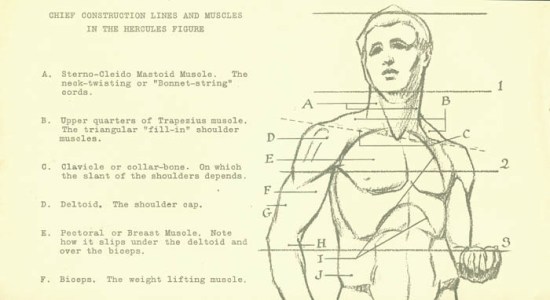
Image scanned from some really old reference material I inherited from my grandfather. Source unknown. Circa the 1930s or 40s.

Image scanned from some really old reference material I inherited from my grandfather. Source unknown. Circa the 1930s or 40s.


This is the final part of a three part series. Part one can be read here, part two here.

Mid Career Portfolios

So you’ve been a designer for a while. Maybe found a good gig at an agency or studio. Or you’ve managed a good run as a freelancer (maybe both?). And you’ve maybe gotten a little complacent. That old portfolio of yours has gathered quite a bit of dust and you haven’t updated in years.

Mistake.

Graphic Design is a fun, wacky career where you’ll always be learning new things and can keep oneself pretty busy most of the time. But, it can also be a very volatile one. One day you have all the work in the world, the next day… a very long, dry spell. Or that really great job at the agency? Suddenly there’s a management change and your dream job has turned into a nightmare. There’s a pretty good chance that as a designer you’ll be a bit of a gypsy, moving from agency to agency over the years. I count myself very lucky that I’ve managed some very long term employment at several companies, but you should never kid yourself into thinking that agency life brings job security. It’s nice to be able to hit the ground running should the need arise.

And I’ve noticed that once you let your portfolio slide (and I speak from personal experience) it can be hard to get the gears rolling again and dust off that old porfolio. Even when the writing is firmly written on the wall.

So what to do?

Try to set aside some time every 6 months to a year and evaluate your work to date and see if there’s anything to be added or taken away from your portfolio. This will make it less of a task to update, since realistically speaking, not EVERYTHING you do will be portfolio worthy. That business card you typeset last minute at 4:30 PM ON A FRIDAY to help your Account Executive impress a prospective client? Probably not portfolio worthy. And sadly, there will be a lot of that.

Be careful though. If you do have an online portfolio, and you are working for an agency or some other company as an in house designer, you may not be able to post every project you work on for the whole world to see. At least not right away. That’s just another good reason to have an old fashioned hard copy portfolio you can lug around. You can have an up to date portfolio and not accidentally let the cat out of the bag on a top secret project or violate your company’s copyright policies on posting stuff to the internet.

By taking small little bits of time here and there, you can keep your portfolio up to date and have the added bonus of reviewing your work every now and then to see how you are progressing. And it won’t seem too impossible to update should you need to start hitting the pavement.

Life Drawing 2011 – Early 2014

In a previous post from a while ago, I mentioned that I had been taking a life drawing class at the Winnipeg Art Gallery for quite some time. I also posted some samples.

A few years have past. I’m still attending a life drawing studio (though not as often as before) and this time it is at the Cre8ery Gallery in the Exchange District of Winnipeg. It’s basically the exact same set up as the Winnipeg Art Gallery except they start off with much shorter gesture drawings at the beginning and they have long 3 hour poses on Thursdays (that I have yet to attend).

The drawings I have here are a mix of the two different studios with the balance being from the Winnipeg Art Gallery. These range from 1 minute gesture drawings to 30 minute poses.

For those interested, these are mostly conté crayon or charcoal pencil drawings on newsprint.

Enjoy.


This slideshow requires JavaScript.

Wallpapers, Part Two

As mentioned in my last post, I’l be posting some wallpapers made with the program Frax. I’ve reviewed it before. You can read about it by clicking here. Each wallpaper will come in a variety of sizes. Hopefully you will find a size close to your monitor settings. At the end of the month, I’ll be putting the whole thing up as a ZIP archive.

And now some legalese regarding the usage. Basically, you may use these in your own work as long as it isn’t sold or distributed as part of a commercial work. Please check out the link if you need a more detailed explanation:


Creative Commons License
This work is licensed under a Creative Commons Attribution-NonCommercial 4.0 International License.


And now that we have that out of the way, here we go:

Frax_002_1024x768


1024×768

1280×800

1280×1024

1440×900

1680×1050

1920×1200

2560×1440

2880×1800

iPad

iPhone


The previous wallpaper can be found by clicking here.

Wallpapers, Part One

Throughout the month of March, I’l be posting some wallpapers made with the program Frax. I’ve reviewed it before. You can read about it by clicking here. Each wallpaper will come in a variety of sizes. Hopefully you will find a size close to your monitor settings. At the end of the month, I’ll be putting the whole thing up as a ZIP archive.

And now some legalese regarding the usage. Basically, you may use these in your own work as long as it isn’t sold or distributed as part of a commercial work. Please check out the link if you need a more detailed explanation:


Creative Commons License
This work is licensed under a Creative Commons Attribution-NonCommercial 4.0 International License.


And now that we have that out of the way, here we go:

Frax_001_1024x768


1024×768

1280×800

1280×1024

1440×900

1680×1050

1920×1200

2560×1440

2880×1800

iPad

iPhone


4 Art and Illustration Community Projects Worth Checking Out

I know to some, crowd sourcing is a four letter word, but I think these user-submitted projects are worth checking out. For inspiration if nothing else. But user-submitted sites are only as good as the submissions, so please, if you have the time and will, try these sites out!


Paper Margin Screen Shot

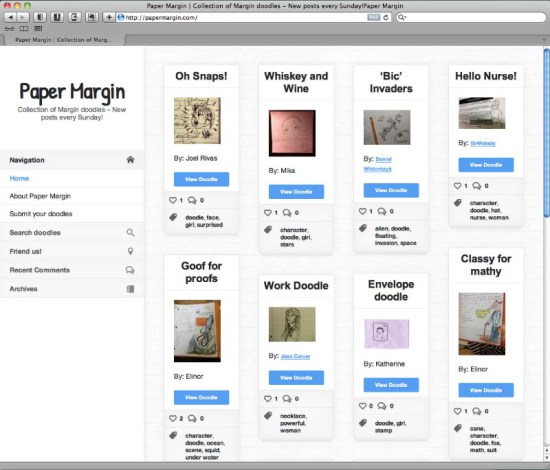
Paper Margin

This is a website (and Facebook page, and Tumblr page) where people submit their doodles. Submitted doodles are posted once a week on Sunday. This would be good for anyone who still uses a phonebook, keeps a notepad by their phone, or has a problem keeping focused during long meetings. Perfect for the artist in everyone!

I would have been submitting stuff for this every day if anything like this was available to me when I was in high school. My notes were always littered with doodles of dragons and dinosaurs. Good thing I was an honour student and did well in school despite my wandering mind. Though I have since found out I contributed to a drop in marks to the people sitting behind me in class, watching me draw as opposed to paying attention in class. Oops.

There might be some controversy (besides contributing to the delinquency of wandering juvenile minds). When you upload your submission, you have to pick a privacy option. One is for the website only, the other allows for the potential publishing in a future book. That implies some financial gain for the owner of the site from other people’s work (such as it is). And I would imagine it unlikely that the people submitting their doodles would ever directly benefit financially from the publishing.

Personally, I am not too concerned about this as long as the privacy option is honoured. I imagine the financial gain from publishing a book of doodles would be pretty small. And there may be some benefit to people if their name and website is attached to the publishing. It already is for the website. And yes, the link backs do work in driving traffic. Though the amount is small as this is a fairly new site.


The Sketchbook Project

 The Sketchbook Project

I’ve already blogged briefly about these guys. The Sketchbook Project is both a physical and online library of submitted sketchbooks. Here’s a brief expert from their site:

The Sketchbook Project is a global, crowd-sourced art project and interactive, traveling exhibition of handmade books. Our mission is to allow anyone to be able to participate in art and to create a collection of work that represents the current state of artists worldwide.

And for anyone who thinks this is cool, but can’t draw, they have this to say as well:

AND DON’T EVEN SAY “BUT, I’M NOT AN ARTIST.”

Because we have people from all kinds of backgrounds in our community. From writers, to poets, to photographers, we use the word ‘sketchbook’ as a loose term for experimentation in creativity. Join tens of thousands of people in this global, traveling art library. See ya’ll on the road.

Everything submitted is available online for viewing. This project is also connected to the Brooklyn Art Library. There is also a Mobile library that travels North America (though mostly the USA) letting people browse the physical sketchbooks. Would be very cool if it ever shows up in Winnipeg. I can think of a number of artist and shared use spaces opening up here in the ‘Peg that would be thrilled to house such an event. Hint, hint.

The only catch is, you have to use one of their sketchbooks. I assume it is to help fund the project. And to ensure a certain amount of control over the size and page count of the books. Keeps it fair to everyone and probably makes it easier to house and showcase all the books if they are fairly uniform. They also have a small online store of merchandise and they offer educational discounts as well. Worth checking out!


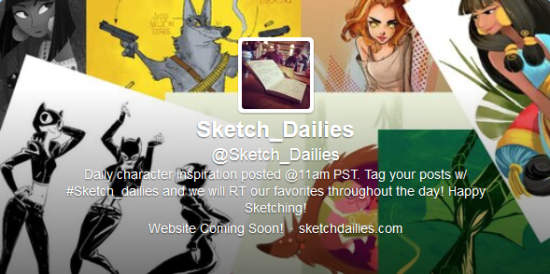
@Sketch_Dailies

@Sketch_Dailies

I found out about this one quite by accident. Lately, I’ve been following a bunch of illustrators and animators on Twitter. Every day there were quite a few of them posting the same type of image. I was wondering why and then someone else on the list is as following asked much the a same question.

The answer: @Sketch_Dailies.

It’s a Twitter feed (and Facebook page) where every weekday at 11 Pacific Standard Time they will post a new topic. Weekends are catch up days for real diehards that didn’t have the time to complete their sketches during the week. Submissions use the hashtag #sketch_dailies and whatever the hashtag chosen for that day’s challenge.

The feed will retweet some submissions but those interested in following everything will have to search the appropriate hashtags. Even if this type of drawing isn’t your thing it is well worth the follow just for inspiration.

It is also the most intimidating as there are a lot of professional illustrators and animators who submit to this. I know from personal experience. It was hard to hit the “send” button, but worth it in the end!


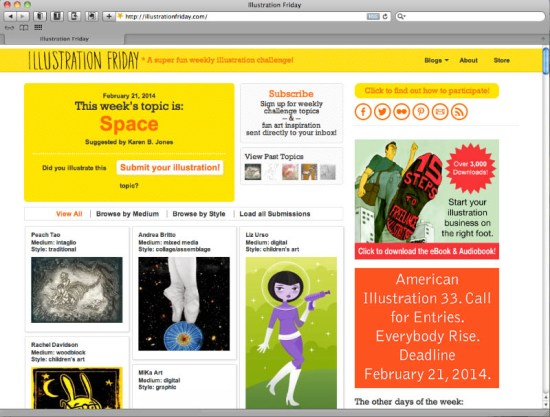
Illustration Friday

Illustration Friday

This is the grand-daddy of online art projects. It seems like it has been around forever. Every Friday a new topic for art projects is chosen. And winners from the previous week are chosen. It’s open to ALL skill levels. And it looks like a wide variety of styles and skill levels are shown. I haven’t had the chance to send any submissions to this site yet, but I’m sure it’s just a matter of time. They also seem to post a lot of articles for the beginner artist and getting yourself established.


This is of course, only just the beginning. DeviantArt has many such groups. Even Reddit has a daily sketch group as well. Enjoy.